The Privacy Settings Worth Changing on Every Device You Own
Your devices collect more information than you probably realize
Every smartphone, laptop, tablet, smart TV, and smartwatch collects data in some form. Some of it is necessary—your device needs to know your language, time zone, or Wi-Fi network to function properly. But many settings are enabled by default simply because they help companies gather analytics, personalize advertising, or improve their products.
The good news is that you don’t need to be a cybersecurity expert to improve your privacy. Spending just 15 to 30 minutes reviewing a few important settings can significantly reduce the amount of personal information your devices share.
Privacy isn’t about hiding something. It’s about deciding who has access to your information and ensuring your data is only collected when there’s a clear benefit to you.
Review your app permissions regularly
One of the biggest privacy risks isn’t your device itself—it’s the apps installed on it.
Many apps request access to your location, contacts, microphone, camera, photos, Bluetooth, or files even when those permissions aren’t essential. A weather app, for example, may only need your location while you’re actively using it, not continuously in the background.
Go through your app permissions every few months and ask yourself whether each one still makes sense. If an app doesn’t genuinely need access to your camera or contacts, turn that permission off.
Most modern operating systems also let you grant permissions only while an app is in use, providing a good balance between convenience and privacy.
You’ll often find that many apps continue working perfectly even after unnecessary permissions are removed.
Limit location tracking whenever possible
Location data can reveal surprisingly detailed information about your daily life, including where you live, work, shop, exercise, and travel.
Many devices and apps request continuous location access even though they only need it occasionally. Unless you regularly use navigation or location-based services, consider limiting location access to “Only While Using the App.”
It’s also worth checking whether your device stores a history of places you’ve visited. Some operating systems maintain location histories to improve recommendations and maps, but not everyone is comfortable with that level of tracking.
Disabling precise location for apps that don’t need it can further reduce how much information is shared while still allowing many services to function normally.
Reduce advertising and tracking features
Many devices include advertising features designed to personalize the ads you see across apps and websites.
Although these systems don’t usually identify you by name, they often rely on unique advertising identifiers that help build a profile of your interests and browsing habits over time.
Most smartphones and computers allow you to reset or disable these identifiers, limit personalized advertising, or reduce cross-app tracking. Browsers also offer settings that block third-party cookies, reduce website tracking, or send privacy preferences to participating websites.
While these options won’t eliminate online advertising altogether, they can reduce how much of your browsing activity contributes to targeted marketing profiles.
Combining these settings with a privacy-focused browser or browser extensions can further improve your online privacy without making everyday browsing less convenient.
Turn on the security features that protect your privacy
Privacy and security go hand in hand. Even the best privacy settings won’t help much if someone gains unauthorized access to your device.
Start by enabling a strong screen lock using a long PIN, password, fingerprint, or facial recognition. Most modern devices also encrypt their storage automatically once a secure lock is enabled, making your information much harder to access if the device is lost or stolen.
Two-factor authentication should also be enabled on important accounts such as email, cloud storage, banking, and social media. This adds an extra verification step, making it much more difficult for attackers to sign in even if they obtain your password.
Automatic software updates are equally important. Updates frequently fix security vulnerabilities that could otherwise expose your personal information.
These settings may not seem like traditional privacy controls, but they play a crucial role in keeping your data safe.
Don’t overlook smart devices in your home
Privacy isn’t limited to phones and computers anymore.
Smart TVs, voice assistants, security cameras, fitness trackers, and even connected appliances often collect usage data. Many include settings that allow manufacturers to gather diagnostics, viewing habits, voice recordings, or product analytics.
Take a few minutes to explore the privacy menu on these devices. You may be able to disable personalized recommendations, opt out of diagnostic reporting, delete stored voice recordings, or limit what information is shared with the manufacturer.
If you no longer use a connected device, consider removing it from your online account or performing a factory reset before selling or giving it away.
Smart home devices can make life more convenient, but they’re also part of your digital footprint.
Small privacy improvements can make a big difference
You don’t have to abandon technology or spend hours adjusting every setting to improve your privacy.
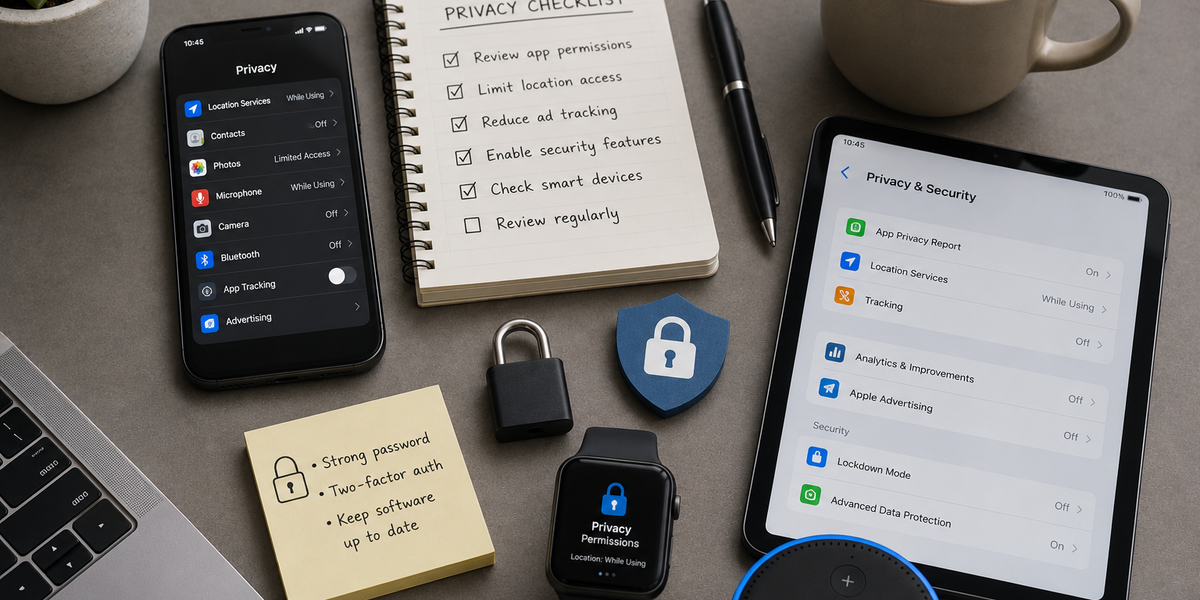
A handful of simple changes—reviewing app permissions, limiting location access, reducing ad tracking, enabling strong security features, and checking your smart devices—can dramatically reduce unnecessary data collection while keeping your devices easy to use.
Privacy isn’t an all-or-nothing choice. It’s about making informed decisions about what information you’re comfortable sharing and ensuring your devices work for you, not the other way around.
The best approach is to review your privacy settings periodically. As devices, apps, and operating systems evolve, new options become available, and a quick check every few months can help you stay in control of your personal information.